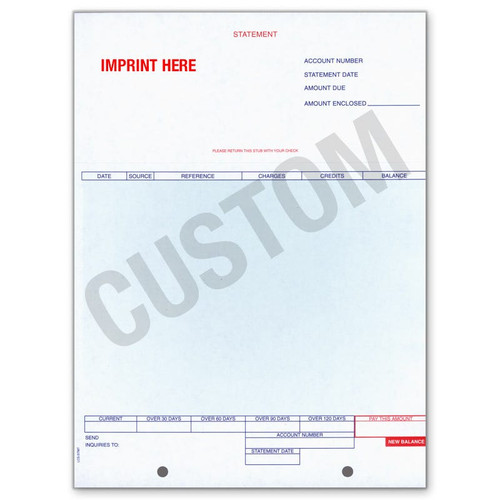
Laser AR Statements

Laser AR Statements

(Showing 4 of 4)

There are two statement types here, and choosing the wrong one means your customers receive a document that does not match how they pay you. Everything else on this page follows from that choice.

A Balance Forward statement shows the prior balance, the period's activity and the new balance, which suits accounts paying against a running total. An Open Items statement lists every unpaid invoice individually until it is settled, which suits accounts paying invoice by invoice and lets you age specific items. For most dealerships the split falls along department lines: wholesale parts and body shop accounts usually pay by invoice, house charge accounts usually pay against a balance. Running both forms is normal rather than a mistake. Perforation direction is tied to the type, so if you are replacing existing stock, check the tear line on the form in the drawer, since it determines what the customer sends back with payment.

Both types come custom imprinted with your logo and up to four lines of text, which is worth more here than on most forms: a statement reaches a customer's accounts payable every month, often to someone who has never visited your dealership. Note that imprinted versions are priced per sheet and the generic forms per pack, so compare on total quantity. All four are built for ERA and work with most computerised systems, but field positions vary, so print a test before committing to a run. Autosoft users should order the Autosoft AR Statements instead, allowing production time ahead of the billing cycle.

Laser AR Statements

There are two statement types here, and choosing the wrong one means your customers receive a document that does not match how they pay you. Everything else on this page is a variation on that choice.

Balance Forward or Open Items

A Balance Forward statement shows the prior balance, the period's activity, and the new balance. It suits accounts with frequent small transactions where the customer pays against the total rather than against specific invoices.

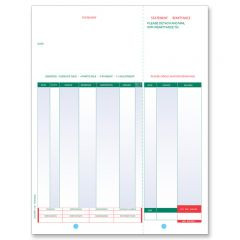
An Open Items statement lists every unpaid invoice individually until it is settled. It suits accounts where the customer pays invoice by invoice, and it is what you need if you want to age specific items rather than a single balance.

For most dealerships the split falls along department lines. Wholesale parts and body shop accounts typically pay by invoice, which makes Open Items the right format. Regular house charge accounts usually pay against a balance, which makes Balance Forward the better fit.

If you run both kinds of account, you may need both forms. That is normal, not a mistake.

Horizontal or Vertical Perf

The perforation direction is tied to the statement type rather than being a separate choice. Balance Forward comes with horizontal perf (Form LZR-STMT-BF) and Open Items with vertical perf (Form LZR-STMT-01).

The perf is how the remittance portion separates from the statement the customer keeps. If you are replacing an existing stock, check the perf on the form currently in the drawer before ordering, since a different tear line changes what the customer sends back with payment.

Generic or Custom Imprinted

Both types are available custom imprinted in Balance Forward and Open Items, personalised with your logo and up to 4 lines of text.

Worth doing on statements specifically. A statement is one of the few documents that reaches a customer's accounts payable department every month, often to someone who never visits your dealership. A generic form with a handwritten address does not read as the same business as your invoices and letterhead.

Note that imprinted statements are priced per sheet while the generic forms are priced per pack, so compare on total quantity rather than the figures shown side by side.

System Compatibility

All four are designed for the ERA system and compatible with most computerised systems. If you run a different DMS, the forms will usually work, but print a test page before committing to a large quantity, since field positions vary between systems and a misaligned statement is unusable.

Autosoft users should see the Autosoft AR Statements instead, which are built for Autosoft FLEX DMS. Allow 2 to 3 business days for standard production, or 1 to 2 on rush, and order ahead of your billing cycle rather than during it.

Related Accounting Forms

See cash receipts books for logging the payments these statements bring in, journal voucher forms for the adjustments that follow, purchase order books, and vehicle inventory forms and sheets.

For mailing, see custom printed envelopes and checks. Browse all car dealership accounting forms and office supplies.

FAQ

Balance Forward or Open Items?

How your customers pay. If they pay against a running balance, use Balance Forward. If they pay invoice by invoice, which is common on wholesale parts and body shop accounts, use Open Items so each unpaid invoice stays visible until settled.

Can we use one form for all our accounts?

Only if all your accounts pay the same way. Many dealerships carry both retail charge accounts and wholesale accounts, and those need different statements. Running both forms is normal and costs little, since neither is expensive per statement.

Does the perf direction matter?

Yes, because it determines which part the customer tears off and returns with payment. Perf direction is tied to statement type here, so check what your current stock uses before switching, and make sure your remittance handling still works with the new tear line.

Will these work with our DMS?

They are designed for ERA and work with most computerised systems, but field positions vary. Order a small quantity and print a test statement before committing to a full run. If you run Autosoft, use the Autosoft AR Statements instead.

Is custom imprinting worth it on statements?

More than on most forms. A statement goes to a customer's accounts payable every month, frequently to someone who has never set foot in your dealership. Imprinting puts your logo and up to 4 lines of detail on it, so the statement matches the rest of your paperwork and gets paid rather than queried.

Why does the imprinted version look cheaper?

Because it is priced per sheet while the generic forms are priced per pack. Work out the total for the quantity you need before comparing. Call us with your monthly statement volume and we will price both ways.